Showing posts with label API. Show all posts

Saturday, September 2, 2023

AI Powered API Mocker - Powering Test Automation

Introduction

APIs(Application Programming Interface) are the most popular way to programmatically integrate different applications. Applications in enterprise often required to be integrated with various applications to acquire enterprise data. Most common integration mechanism used is REST API. This also brings challenges in testing the application when it is connected to many other applications.   Most of the time test is conducted to establish connection, validate the contract, checking if API exists as per the contract. Less often it is used to test the actual data in automation space. 


Automation Challenges


The main challenges in testing such applications are: 


  • With commercial and SaaS based API servers metering their API consumption, it incurs high cost to consume APIs for testing especially in load testing scenarios.  
  • No control on external applications and downtime. 
  • No control on network. Network issues block the connection.
  • Time consuming external calls

Testing of a system that has various integrations through APIs to other systems, is cumbersome due to the above listed challenges. Such system cannot be tested in silo also. The lack of good integration testing can lead serious failures in production. 


Solution


This solution addresses the above mentioned challenges by developing a system that simulates external API Server to serve the API request but with closely matching data. Data from this system is not reliable and cannot be used for testing. However, this system helps in testing successfully the connections, input validation,  interface contract validation, response format check, and response validation.


Benefits:

  • As this system is setup locally, it provides reliable network.
  • Eliminates API metering cost
  • Quicker with option choosing faster network for deployment
  • Downtimes can be controlled


This simulator system is built as server that receives requests from the application that is subjected for API integration testing. 


Fig-1 : Simple Flow


Mock system is built as server to intercept the outgoing traffic from the application that is subjected for API integration testing. 


Mock system components:

  1. Frontend Server:  Receives requests from the application and redirects to ML model serving component.
  2. Data loader: Helps in gathering API data from various sources to feed to model for training.
  3. Random data generator component
  4. ML Model Trainer: To train with API requests and responses to predict accurate responses. Train data for this model is HTTP request parameters, and HTTP reposes parameters which includes both valid and invalid request data.
  5. ML model serving component: This serves the outcome of the ML model and send the output to Response Data Builder. 
  6. Mock Response Data Builder: Builds HTTP response data in JSON format to send it back to application. 
  7. JSON Extractor: Extracts data values from JSON and converts to CSV file. 
  8. Data store: To store ML model and input data
    Fig-2 : High Level Solution

Mock Response Builder

This is the core part of the system and here are the approaches adopted to solution the data generation. Adding more details here to make you understand why this is challenging. 

API request and response comes with various types of data. This not just includes datatypes like String/text, Clob/large text. It has to support boolean, chars, numerals(int, long, double), alphanumeric, binary (for images, & files) and etc. API mocker should mock all these types of data in order to successfully fulfil the incoming request like the original server. Every data type poses different type of challenges to the mock system to generate it successfully. A simple random generator may not work well for all data types if results need to match the original server response. 

 
1. Random Data Generator: 
For most of the data types like boolean, numeric, chars, list(repeater), date, country, city etc. random generator solutioning is used. Randomness is a simple way to achieve content generation required in providing as part of response to the API request. Generating object identifiers (IDs) also done using random generator. 

2. Machine Learning for Data Generation:
Machine learning plays crucial role in the solutioning. Response content generation based on the input request is powered by machine learning.  Reading through the below solution overview is a must to understand the role of AI in this solution. 

Evaluated models: Two parametric algorithms are tried in my short project.  A set of labeled examples, with each example comprising of a set of feature values and a corresponding class label is used for training. Model uses it and learn a general rule to classify new examples that are presented to it later. This system is trained with data on external APIs mainly with text data. The scope doesnot cover image and file data types. 

1. k-Nearest Neighbor (KNN)

2. Support Vector Machines (SVM)


SVM showed slightly better accuracy on the dataset I used for one small example. The data set contained text retrieved from mere 100 API request labels. I have not extensively tried with model tuning as the main focus was on building end to end API Mocker without much effort on AI.   


Im planning to try out open-source pretrained(foundational) generative model in future as the trend shows more promising outcomes and removes the hassles of training. 


Model Training

Below are the steps involved in model training:

  1. Data Sourcing: Crawling target system APIs, Swagger like API documentation, List of APIs and input params in CSV 
  2. Pre processing and Data preparation:
    1. Data collected is fed to CSV file format for each API request method. Seperate csv files are created for each API request
    2. Data is classified as input parameter and target parameters
  3. Data types used : Valid input values, User invalid input values, Boundary conditions
  4. Training method: 
    1. Training with actual request parameters and responses
  5. HTTP Methods to be supported : GET, POST, PUT and DELETE
Fig-3 : Training the model


Real time serving using model output

Configuration specifies the attributes required for data generation through model. When there is a need for text generation is identified, trained model is invoked. Data extracted from request JSON goes through validation phase. Data validation is done as per the trained data(from Swagger API) or manually fed documentation. 


Fig-4 : Real time model serving


Response JSON generation

  1. By taking the output of the above model, JSON is constructed. 
  2. Respond back with SON format

Most importantly, this application allows API call to original server in case it needs to be tested against it rather than mock server. There will be a toggle switch provided by adding the URL of the application to bypass the mock server and make direct connection to target API server.


Conclusion


The effectiveness of API testing is greatly increased when tests use realistic data, representative of real-world production conditions. Generating tests from production data must be done with care due to the risk of exposing sensitive data. Without automation, creating real-world useful tests is difficult to achieve at scale because of the high labor cost of combing through mounds of data, determining what is relevant, and cleansing the data of sensitive values.


This system is not meant for accurate testing of data, and should never be used when accuracy and precision of API response has to be verified. This is suitable mainly for interface contract testing when testing against original API server is posing challenges as mentioned above. 

Sunday, July 31, 2022

The Role of Web Application Firewall(WAF) in Security


“A web application firewall (WAF) is a specific form of application firewall that filters, monitors, and blocks HTTP traffic to and from a web service.” -Wikipedia


According to the PCI DSS Information Supplement for requirement 6.6, a WAF is defined as “a security policy enforcement point positioned between a web application and the client endpoint.


WAF is an application level firewall that is commonly used to protect web applications. It is located in front of web applications to monitor HTTP traffic coming from internet. It is used for detecting and blocking malicious requests in real time. It forms the first line of defence to protect web environment of users or companies. 


Types of WAFs


WAF functionality can be implemented in software or hardware, running in an appliance device, or in a typical server running a common operating system. It may be a stand-alone device or integrated into other network components.


Hardware WAF

This type of WAFs comes as part of hardware appliance which can be deployed in the local network where main web servers would be running. This device comes with its own computing resources and suitable for websites that handles heavy traffic.


Software WAF

This software WAF installed normally in a virtual machine setup and maintained. It is much cheaper and flexible compared to hardware WAF but the throughput could be slower than it. 


SaaS WAF

This type is managed by cloud service provider and there is no maintenance overhead as it it takes care by service provider. Optimising, patching, and managing is done by cloud service provider. The ease of use and lower cost are the advantages of it. 


Core Capabilities of WAF

These are must-to-have features that most of the WAF supports and some commercial ones offer many more advanced features.


Reverse proxy for intercepting the incoming traffic

This is the most crucial feature that every WAF must support. Every incoming request tower server is first intercepted by the WAF which works exactly like reverse proxy.


Rule based logic, Parsing and signatures

Rules or Policies specifies what WAF needs to look out for. They are specific samples in web traffic in the incoming data stream. They also include the blocking action to take on detection of an attack attempt.


Protection against OWASP top 10 security flaws 

At a minimum, WAFs must detect the OWASP listed top 10 attacks. The OWASP Top 10 is a standard awareness document for developers and web application security. It represents a broad consensus about the most critical security risks to web applications.
The OWASP produces a list of the top ten web application security flaws. 


[Picture courtesy:OWASP]

Configurable for covering new attacks

Customizable for detecting new types of attacks. Users should be able to customize the rules with simple configuration. This feature help users to modify the configuration on demand.


Blocklists and Allowlists

The feature supports both positive and negative security model against known attacks


Logs for data analysis

Logs helps users to debug and analyze the data stream


Advanced Features

There are many advanced features being offered by commercial WAFs to add value to their offerings. 


DDOS protection 

Protection against denial of service attacks


UI Console

Intuitive dashboard user interface for viewing stats and other reports. It can used for quick data analysis as well. 


Threat intelligence

AI-based machine learning to detect suspicious activity. Detects the latest hacker attack strategies by identifying hacking patterns.


Failover protection

As WAFs become bottleneck and single point of failure in the whole ecosystem, this feature ensures high availability. By handling failure, it rolls new WAF instance in case of crash. 


High HTTP throughput

Faster assessments of wide variety risks using distributed WAFs help maintaining good throughput. 


Sensitive data protection 

This feature alerts on responses containing sensitive data


Plugin to existing web servers

Certain web servers allow extensions to play along to help users extend the capabilities. WAF as plugin to servers make it uniform and easy to configure. 


Brute force attack prevention 

Protection against brute force is a feature that WAFs use to protect against attacks by automated tools that runs successive attacks to gain control.


Attack analysis

Helping users analyzing attacks adds high value to WAF offerings.  


Continuos upgrades

WAFs must continuously upgrade to tackle the new attack types. Every year, there were thousands of new attacks detected. More than 3000 new vulnerabilities are discovered in 2021 year alone. 


Is WAF Silver Bullet?

WAFs can only detect attacks at HTTP layer and not in other layers. For example, at network layer there should be separate network firewalls and IPS(intrusion prevention systems). 


Inspite of the numerous features, enablers, and detection techniques, there are various tools an techniques used to bypass WAFs today. Some of the known approaches used by hackers to bypass WAFs are browser emulation, obfuscation, encodings, and payload characters modification. As WAFs rules and policies are configured mainly based on regexp, hackers figure innovative ways to bypass it by modifying payloads. There are automated tools used by hackers to speed up the process and tools help them to find out the vulnerable areas inside WAFs.


Conclusion

WAF is not a silver bullet and hackers continuously find new ways to break its protection. One can't relax just by introducing WAF in the infrastructure. The protection process is never ending with everyday hackers finding out new ways to break in. It requires continuous effort to keep updated on the latest security vulnerabilities and upgrading the system for it. 


Wednesday, February 16, 2022

Future of Enterprise Application Integration(EAI) Middleware


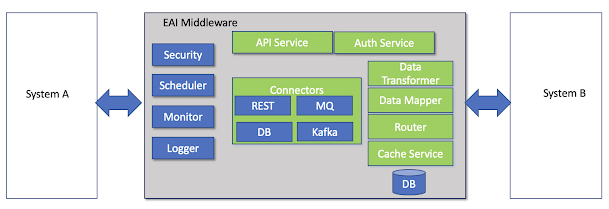
There are various types of middleware in software industry. This blog limits the scope to EAI middleware that is widely used in enterprises. This type of
  middleware adds integration capability to a functional system that end users interacts with. It offers connection to heterogeneous systems, data transformation, fields mapping, routing logic and sometimes rule engine.  Technical teams also prefer middleware to unload certain heavy operations from main functional systems. 

Typical functionalities of EAI middleware

Tuesday, November 16, 2021

EAI Tool Building With IBM Public Cloud Services

There are plenty of EAI middleware tools in the market. Why build a new one in that case? The answer for this question is always debatable with various reasons cited like complete control on the tool, extensibility, customizable to your own unique use cases and of course low pricing. The low pricing part is more tempting with cheap cloud infrastructure, varying loads, and fast changing business dynamics supporting the justification process. 

If you are convinced that low price is the most sought out, don't forget to check important features that any EAI tool would perform and compare that with your requirements. Every popular tool in market pretty much offers basic features like minimal coding, quick mapping, real time/batch mode, multiple connectors, retry mechanism, error handling, monitoring, and reports. There are niche features like AI based data mapping or integration that some modern tools provide. If you are looking for most basic features and you don't want to end up learning yet another tool, its time to try IBM Public Cloud(IPC) services for developing your own EAI tool.

The microservices based containers over cloud architecture provides mechanism for building such tool quickly and efficiently. There are multiple offerings by IBM public cloud to support such requirements. There is a Cloudpak that comes with perfectly packaged services to quick start the journey. Other hand,  there are individual services right from computing clusters to database that you can cherrypick to build your own infrastructure package. 

I want to share my experience of setting up my own services and how easy it was. To start with, I wanted all the basic features that are mentioned above in the tool. Few requirements that I focussed are:

  • Integration options that was demanding REST API, Kafka and DB integration. So there is a clear need of multiple connectors
  • Data sync interval - Realtime is the requirement in my case
  • Exclusive data mapping with heterogeneous applications need to be integrated
  • Assured delivery - Can't miss even a single transaction 

The above requirements clearly pointing to the kind of system needs to be developed that includes :

  • API server to listen to calling application - A microservice with light weight server needs to be developed here
  • Independent connectors to connect to API, Kafka and DB of applications - Utility backend microservices for providing connection and retry logic 
  • Data Processor - Yet another microservice that process the data and prepares the mapping to a specific target system
  • A database that can persist data temporarily in case of connection issues
Techno-Functional overview


Development Effort

Listing the effort required to setup for fulfilling above requirements.

IPC infra overview

Minimal IPC Services required:
  • IKS cluster with 3 nodes  and PV - To develop microservices
  • MongoDB - NoSQL DB for temporary persistence
  • LogDNA - Log analysis for debugging purpose

Developing Microservices

Setting up Redhat Open Shift (ROKS) or IBM Kubernetes Service(IKS) to build cloud native containerized microservices takes not more than 20 minutes. This includes all operational tasks like creating separate resources for test and production environment.

The technology used is Python with Flask. Connectors are the main services that would take longer time as it requires end to end testing, retry mechanism to handle errors etc. using different integration approaches. 

Microservices created:

  • Three different connectors for DB, Kafka and REST API
  • Auth server for OAuth2.0
  • API server to receive requests
  • Data processor that handles mapping, transforming and orchestration
CronJob scheduler is created to handle error retries at regular intervals. 

MongDB Collection Setup and LogDNA setup

MongoDB is a quick setup with simple collection creation to store the failed records for later retries. LogDNA for logging analysis is also a fairly easy setup before you start coding and adding log statements.

DevOps Setup

  • Github setup is not part of Cloud services and it needs to be done separately 
  • Jenkins comes by default with ROKS. So you can quickly develop pipelines with the stages you need using groovy scripts. I added unit test, test coverage, static code analysis, build, and publish to image repository in CI pipeline
  • Separate test and production environment would take duplicated effort
  • Yaml files for shared configuration or Vault setup to manage secrets

Deployment Setup

Deployment task was setup as part of CD pipeline in Jenkins. Each microservices Yaml are created with 200m cpu and 256Mi memory limits and deployed with maximum 3 replicas based on 70% CPU utilization. Scheduler is created as cronjob and scheduled to run on specific intervals to check and process error records. 


Conclusion

The details shared above are at high level and the low level details would define the exact effort required. My intention is to share this as quick reference material as I experienced the easiest way of middleware development using IBM public cloud services. 


Wednesday, May 29, 2019

Error Handling in Application Integration

Error Handling in Application Integration


Application integration not always comes with happy paths irrespective of domains and the mechanism adopted. More and more enterprises are adopting micro services that calls for integration of various applications in real time. Not always this integration result in successful data flow due to various reasons that includes business, application and network errors or limitations. Handling such failures in real time is critical to the functioning of systems and fulfill the assured delivery requirement. Understanding the types of errors/failures, processing, retrying and transforming provides higher rate of success.

The areas or activities that need to be looked into solve this problem are listed below:
  • Identifying the errors
  • Defining error categories
  • Formulating recoverable and non recoverable errors
  • Defining workflow steps - Automated or Manual 
  • Retry mechanism for recoverable errors
  • Persistence logic for long term recovery
  • Message reconstruction process
  • Defining manual intervention process

Usecase with REST API integration

Error Identification and Categorization


400 category : User Input Error(System related)
•401  - Authentication issue : Retry for getting fresh token. Even after fails, then send alert.
•404 – Retry logic required
•403 – May be one time retry and then Alert

500 category – Internal Server Error (Business validation related)

•For messages, it is important figure out all the codes from target systems.
•Important to find out if the error codes is common or specific to each type of data invalidation in each spoke. We have to start only from the codes. 


Recoverable and non recoverable errors

Errors like temporary network failures, application maintenance downtime can be recoverable. Data validation error requires transformation either automatically or manually depending on the complexity of business rules. Retry logic should be designed such a way to handle these cases individually. 

Retry mechanism for recoverable errors

Picture below illustrates Short term and long term retry logic. 


Circuit breaker design

The simple circuit breaker is used to with short term retry to avoid making the external call when the circuit is open, and the breaker itself should detect if the underlying calls are working again. We can implement this self-resetting behavior by trying the remote call again after a suitable interval, and resetting the breaker if it succeed. This also prevent the unexpected failures with remote calls. 


Persistence logic for long term recovery

The error along with the  message need to be temporarily stored in order to resend the message after the correction has been made to the integration flow. The data model should include: 

Configurable fields for Category Definition:
1. Retry attempt – Number
2. Frequency/duration – Number  - to show minutes
3. Alert required – varchar -  to store email
4. Manual Flag – int -  Manual, Auto, None
5. Priority  - int - High, Medium, Low

These are additional message fields:
1. Status – varchar or int to store Pending, Completed, On Going. – (Message Table)
2. Unique id (Trace ID) - required to identify the error apart from message  object so that we can treat each message differently. This has to be primary key.  (Message table)
3. ID column has to be oppty/LI id. 

Defining manual intervention process

There are errors that cannot be resolved automatically by program logic. This kind of error call for manual intervention. For example, if target system is expecting alpha numerical value for certain mandatory field and source system sends numerical value, the synchronization fails in this case. Unless the value is changed to meet the target system, it is not possible to make the flow successful. User intervention is required most of the time to correct the data or system. Every such cases needs be identified, processes to be well defined and messages handled accordingly before resending the message.   

Conclusion

Few other areas that need to be included are Scheduler for triggering the long term retry, message reconstruction process, and  alert/notifying mechanism. With these systems in place, it becomes easy and manageable to handle both expected and unexpected error scenarios. 
Application integration is never complete without robust error handling process and the benefit of that is enormous. Happy to assist further and take your feedback especially the improvements that you could think of.